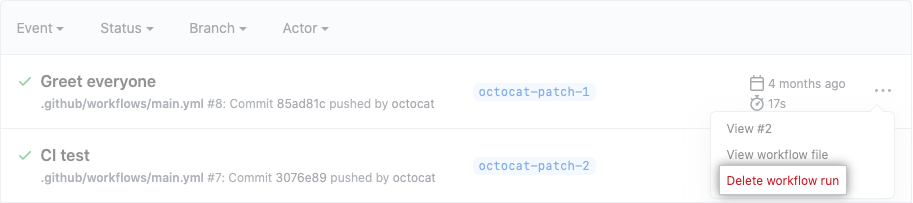
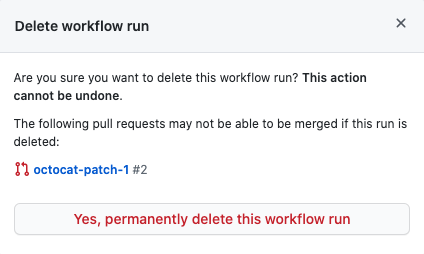
文章版本: Free, Pro, and Team Free, Pro, and Team Enterprise Server 2.22 GitHub Actions Managing workflow runs 删除工作流程运行 文章版本: Free, Pro, and Team Free, Pro, and Team Enterprise Server 2.22 删除工作流程运行 You can delete a workflow run that has been completed, or is more than two weeks old. GitHub Actions 可用于 GitHub Free、GitHub Pro、组织的 GitHub Free、GitHub Team、GitHub Enterprise Cloud 和 GitHub One。 GitHub Actions 不适用于使用旧版按仓库计划的帐户所拥有的私有仓库。 For more information, see "GitHub's products." 此文档对您有帮助吗? 想了解新的文档功能和更新?注册更新! 我们在不断改进文档,希望听到您的改进建议。 您遇到了什么问题? 必选 选择一个选项 信息不清楚 内容令人困惑 这篇文章没有回答我的问题 其他 告诉我们如何改进 可选 如果有更多问题,我们能联系您吗? 可选 发送 谢谢!您的反馈已提交。 帮助我们创建出色的文档! 所有 GitHub 文档都是开源的。看到错误或不清楚的内容了吗?提交拉取请求。 做出贡献 或, 了解如何参与。 Write access to the repository is required to perform these steps. 在 GitHub 上,导航到仓库的主页面。 在仓库名称下,单击 Actions(操作)。 在左侧边栏中,单击您想要查看的工作流程。 要删除工作流程运行,请使用 下拉菜单并选择 Delete workflow run(删除工作流程运行)。 查看确认提示并单击 Yes, permanently delete this workflow run(是,永久删除此工作流程运行)。