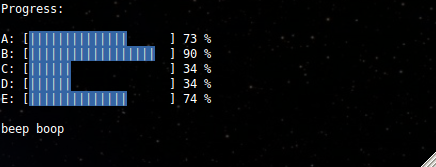
render multiple progress bars (and stacks) at once on the terminal
Control multiple ANSI progress bars on the terminal.

var multimeter = require'multimeter';var multi = multimeterprocess; multidrop var iv = setInterval var p = barpercent; barpercentp + 1; if p >= 100 clearIntervaliv; 25;;
var multimeter = require('multimeter');
Create a new multimeter handle on the supplied stream/process objects, which will be passed directly to charm.
If you pass in a charm object that will be used instead of creating a new one.
Create a new progress bar at (x,y) with params which default to:
If y is negative or '-0' it will be treated as a relative coordinate.
Accepts all parameters as a bar but returns a stack for pushing and popping text and bars:
var stack = multi0 1 pad: true type: 'stack' width : 20 solid : text : '|' foreground : 'white' background : 'blue' empty : text : ' ' ; var dl1 = stackpush'download1' 'bar';stackpush'Another download starting...';var dl2 = stackpush'download2' 'bar';dl2percent10;// ... dl2percent100;stackpush'download2 is finished';stacksplice'download2';
Create a new progress bar at an absolute x and relative y coordinate with
respect to the present multi.offset.
Create a new progress bar at the present cursor location. The bar object will
be passed to cb(bar) once the cursor location has been determined.
Call event emitter functions on the underlying charm object.
This getter/setter controls the positioning for relative progress bars.
Increment this value whenever you write a newline to the stream to prevent the pending progress bars from drifting down from their original positions.
Update the progress bar to p percent, a value between 0 and 100, inclusive.
The text to the right of the progress bar will be set to msg.
Update the progress bar with a ratio, n/d.
The text to the right of the progress bar will be set to msg.
Pushes the specified text onto the stack. If params is set will attempt to create a new Bar instance using the stack defaults if necessary. The text to the left of the progress bar will be set to text.
Removes the line in the stack for the specified text
The charm object used internally to draw the progress bars.
With npm do:
npm install multimeter
 indexzero
published
2013-03-04T07:37:29.488Z
indexzero
published
2013-03-04T07:37:29.488Z
bar, progress, meter, status, console, terminal, ansi


