
 Formed in 2009, the Archive Team (not to be confused with the archive.org Archive-It Team) is a rogue archivist collective dedicated to saving copies of rapidly dying or deleted websites for the sake of history and digital heritage. The group is 100% composed of volunteers and interested parties, and has expanded into a large amount of related projects for saving online and digital history.

- In the top right corner of GitHub Enterprise, click your profile photo, then click Your profile.

- On the left side of your profile page, under "Organizations", click the icon for your organization.

- Under your organization name, click Settings.

- In the left sidebar, click Installed GitHub Apps.

- Next to the GitHub App you'd like to review, click Configure.

- Review the GitHub App's permissions and repository access.
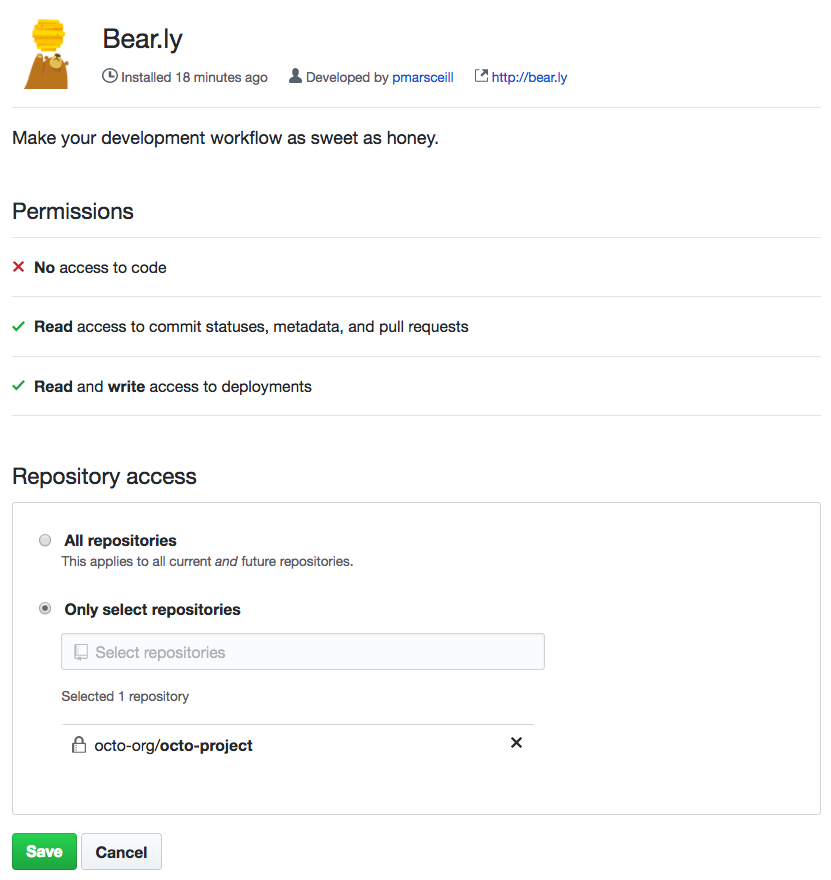
- To give the GitHub App access to all of your organization's repositories, select All repositories.
- To choose specific repositories to give the application access to, select Only select repositories, then type a repository name.
- Click Save.
Article version: Enterprise Server 2.19
Article version: Enterprise Server 2.19
Reviewing your organization's installed integrations
You can review the permission levels for your organization's installed integrations and configure each integration's access to organization repositories.
Help us make these docs great!
All GitHub docs are open source. See something that's wrong or unclear? Submit a pull request.
Make a contribution